Local SEO Blog Calendar Template for 2026

You keep telling yourself you will blog weekly, but life gets busy. Between client work, phone calls, and running your business, writing a post often falls to the bottom of the list.
That is exactly why you need a local seo blog calendar template. It takes the guesswork out of what to write and when to publish it.
In this post, we will show you how to build a simple content plan in under 30 minutes. You will leave with a clear system that helps you attract nearby customers on autopilot.
Why You Need a Local SEO Blog Calendar
Consistency is the secret sauce for local search rankings. When you publish regularly, Google sees your website as active and relevant. An abandoned blog with one post from months ago signals that your business might be out of date. A steady stream of fresh content keeps your site in the running for local search results.
A calendar also saves your sanity. Instead of staring at a blank screen every Tuesday, you already know what you are writing about. You reduce stress because the planning is done in advance. You simply sit down, write, and schedule.
Local topics are your golden ticket. Writing about community events, neighborhood guides, or specific service areas attracts people who are ready to buy. These readers are closer to making a decision than someone who found you through a generic national post. Automation makes this easy to stick to, because you can batch your work and let the tools handle the rest.
The Consistency Factor
Think of your blog like a storefront. If you only opened once a month, customers would stop checking. The same logic applies to your website. A regular schedule builds trust with both search engines and potential clients.
Your 30-Minute Plan to Build a Local SEO Blog Calendar Template
Grab a coffee and set a timer. This process is fast because we are not overthinking it. You just need a structure that works and a list of ideas to pull from. Here is your step by step plan.
- Choose your tool. Open a simple Google Sheet or create a free Trello board. Do not buy expensive software yet. You need columns for dates, titles, and status, and that is it.
- Brainstorm local topics. List your core services, then think about the questions customers ask you daily. Write down five to ten ideas. Think about things like "how to prepare for a roof inspection" or "what to do after a water leak."
- Map topics to keywords. For each idea, write down the phrase someone would type into Google. Make sure you include your service plus your area. This is where your local seo blog calendar template comes into play, as it helps you track these terms.
- Set a realistic frequency. Do not commit to three posts a week if you cannot handle it. One solid post per week is better than three rushed ones. Consistency beats volume every time.
- Fill in the dates. Assign each topic to a specific Tuesday or Thursday. Add a status column and mark everything as "Idea" for now. You have just built your roadmap.
Close the laptop when the timer goes off. You have done the hard part. Next week, you just pick the first topic and start writing.
What to Include in Your Local SEO Content Calendar
Your calendar is only useful if it contains the right details. Too much information makes it a chore to update. Too little leaves you confused. Here are the core columns we recommend for our clients.
- Post title and target keyword. This keeps you focused. If you are writing about "emergency HVAC repair," do not drift into a story about furnace maintenance history.
- Publish date and time. Mornings tend to work well for local businesses. Pick a time and stick to it so your audience learns when to expect you.
- Author or writer name. If you outsource or have a team member, assign ownership. This prevents the "I thought you were doing it" problem.
- Status column. Use simple options like Idea, Draft, Scheduled, and Published. This gives you a quick visual snapshot of your pipeline.
- Notes for promotion. Jot down where to share the post. Add a reminder to link it to a related service page or a past article you wrote.
Keep It Simple
You do not need a complex dashboard. A clean list that you check once a week is enough. If the calendar becomes a burden, you will stop using it.
Automate Your Blog Scheduling with These Simple Tools
Automation is where the magic happens. You can write three posts in one afternoon and let the system handle the rest. This turns your blog calendar for small business into a hands free operation.
WordPress has a built in scheduler that is incredibly reliable. Write your post, click the edit link next to the publish date, and choose a future time. Hit the schedule button and walk away. The post goes live exactly when you planned.
For planning, Google Sheets works wonders. You can add a dropdown menu for your status column. This keeps your data clean and makes it easy to filter what needs attention. Trello or Asana are great visual alternatives. You can drag cards from "Ideas" to "Scheduled" as you complete tasks.
Connecting Your Tools
Promotion is part of the job. Use Buffer or Hootsuite to queue up social media posts announcing your new content. You can schedule these a week in advance. If you want to get fancy, connect everything with Zapier or IFTTT. You can create a trigger that automatically adds a new blog post to your social queue.
How to Plan Local Blog Posts That Rank
Writing for local SEO is different from writing for a national audience. You are competing in a smaller pool, which means you have a better chance of winning. You just need to focus on the right topics. Here is how to plan posts that actually bring in traffic.
- Focus on topics your neighbors search for. Think about queries like "best plumber near me" or "affordable dentist in my area." These have high intent because the searcher is ready to act.
- Include your city or neighborhood naturally. Put it in your title and your headings. Do not stuff it awkwardly. Just write "Roof Repair in Oakwood" instead of "Roof Repair Services."
- Answer real questions. Type a topic into Google and look at the "People Also Ask" box. These are actual questions from real users. Write a post that answers one of them clearly.
- Write for humans first. Your reader wants a solution, not a keyword dump. Explain things simply and use examples they understand. Then go back and tweak your phrasing to match search intent.
- Use your local seo blog calendar template to stay on track. If you plan around questions and local landmarks, you will never run out of ideas. The calendar keeps you honest about your publishing schedule.
Conclusion: Start Your Free Blog Calendar Template Today
Building a content system is not complicated. You pick a tool, brainstorm a few local topics, and set a schedule. In 30 minutes, you can have a month of posts planned and ready to go. The automation tools we discussed will handle the heavy lifting of publishing and sharing.
Do not let another week pass without a fresh post. Download our free template and map out your next four articles today. Your future customers are searching for you right now. Give them a reason to click on your site instead of a competitor's. Schedule your first post this week and watch your local visibility grow.
Part of our complete guide: Automated SEO Blogging for Local Businesses
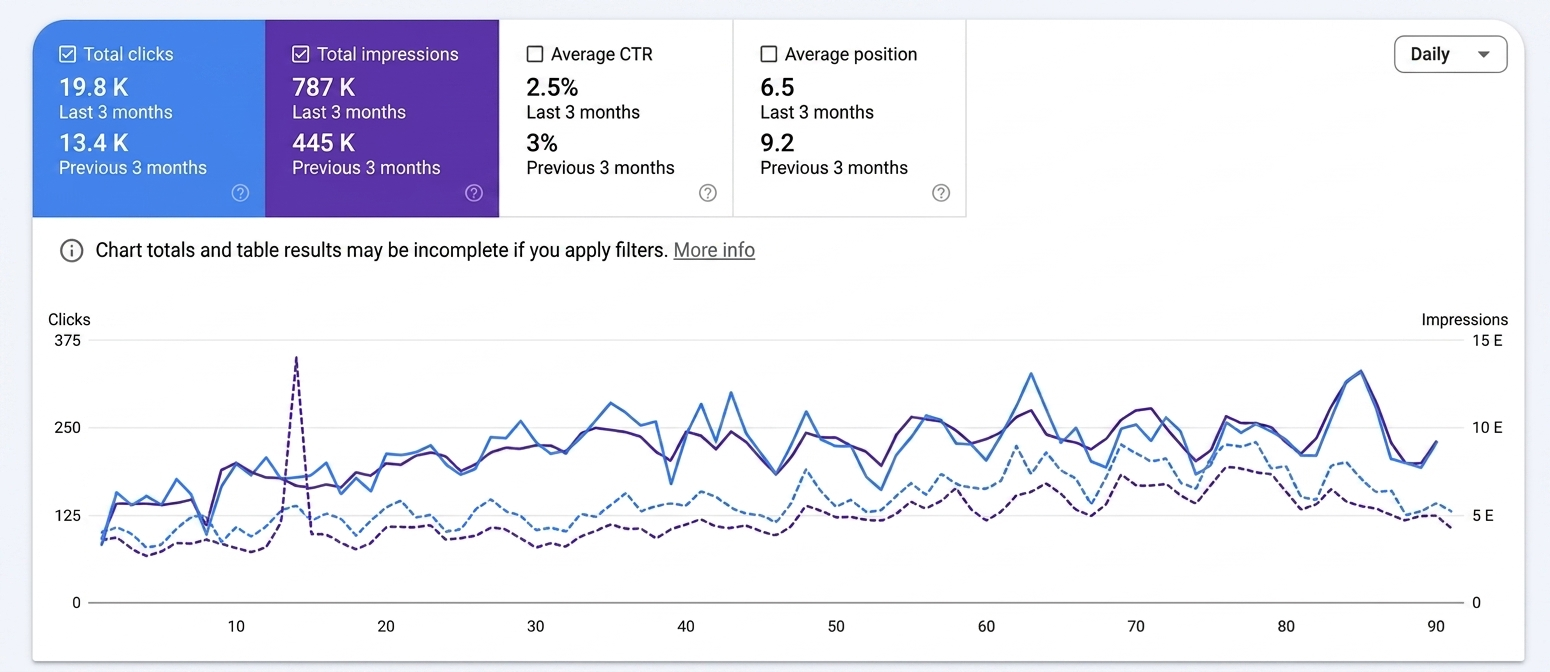
A post a day, every day, for 90 days. This is what that compounds into on a blog that starts from nothing.