How to Measure Success of Automated Local SEO Blogging

You started your automated local SEO blogging to save time and grow your business. Now you are wondering if those posts are actually working, or just quietly filling up your website. You need a clear way to measure success of automated local seo blogging, and that is exactly what this guide delivers. We will walk you through the exact metrics, tools, and steps to track your automated blog performance. By the end, you will know precisely what is driving customers and what needs a little tweaking.
Why Measuring Automated Blogging Matters
Automated blogging saves you hours every week, but it also creates a blind spot. When a human writes, they naturally think about the reader. When software publishes, you need a system to check if the content still connects. Without measurement, you are guessing which posts bring in phone calls and which ones just sit there.
This is where key performance indicators, or KPIs, come into play. KPIs are the numbers that tell you if you are winning. For local SEO, that means tracking organic traffic, leads, and sales. You also need to understand ROI, which stands for return on investment. It is a simple question: are you getting more value from your blog than it costs to produce?
Analytics tools are your eyes here. They show you exactly how people find your posts and what they do next. We will set up a simple system for you to track automated blog performance. This step by step guide will help you measure success of automated local seo blogging without needing a degree in data science.
The Cost of Ignoring the Numbers
Many business owners publish and pray, hoping for the best. That approach wastes money on content that misses the mark. Measuring your blog lets you double down on topics that work. It also helps you fix pages that are almost good enough to rank.
Step 1: Define Your Goals and KPIs
Before you look at any dashboard, you need to know what you want. Are you trying to get more foot traffic to your store? Do you want people to fill out a contact form? Maybe you want direct phone calls from new customers. Your goals will decide which local seo blog kpis you watch.
Start with the big picture. If you are a plumber, a great goal is booked service calls. If you run a restaurant, you might want directions requests or online reservations. Pick one primary action you want readers to take. Then choose two or three supporting actions, like signing up for a newsletter.
Choosing the Right Local SEO Blog KPIs
For local businesses, rankings matter, but they are not the whole story. You need to track metrics that connect to revenue. Focus on organic sessions, which are visits from search engines. Also watch conversion rate, which is the percentage of visitors who take your desired action. Engagement metrics like time on page also tell you if your content matches user intent.
Set Specific Targets
Vague goals like "get more traffic" do not help you adjust. Instead, set a target such as "increase organic traffic by 20 percent over three months." You might also aim for five new leads per month from your blog content. These numbers give you a finish line to measure against.
Step 2: Set Up Analytics Tools
You cannot manage what you do not measure, so you need the right tools installed. Google Analytics is the industry standard and it is free. It tracks every visitor, their location, and what they do on your site. Google Search Console is its partner, showing you which queries trigger your blog posts in search results.
First, create an account for each tool if you have not already. Then add the tracking code to your website. If you use a platform like WordPress, a plugin can handle this for you. Our team always recommends linking Google Analytics and Search Console together for a complete picture.
Enable Goal Tracking for Conversions
Analytics alone just shows traffic. You need to define what a successful visit looks like. In Google Analytics, you can set up Goals. For example, you can track when someone clicks your "Call Now" button or submits a contact form. This turns raw traffic numbers into business insights.
Ensure Data Accuracy
Check that your tracking code appears on every page of your site. A missing code on a single post can skew your entire report. Also set up filters to exclude your own office visits. You do not want your team's clicks counting as customer traffic.
Step 3: Track Key Metrics
Once your tools are live, you need to know which numbers matter most. Here is a breakdown of the core metrics to watch for your automated blog. Look at these on a weekly basis to catch problems early.
- Organic traffic: This is the number of visitors who find you through search engines. It shows if your blog posts are being discovered. An upward trend means your content is gaining visibility.
- Keyword rankings: Track where your posts appear for specific local terms. If you rank on page two, you are close. Page one is where the clicks happen.
- Engagement metrics: Look at average time on page and bounce rate. A high bounce rate means people leave quickly, often because the content missed the mark.
- Conversions: This is the ultimate proof of success. Count form fills, calls, or chat messages that came from blog visitors. These are your actual leads.
- Mobile performance: Many local searches happen on phones. Check that your pages load fast and look good on small screens. Ignoring mobile users is a common mistake that kills your results.
Monitoring These Metrics Regularly
Set a reminder to review these numbers every week. You are looking for patterns, not panicking over daily swings. A single viral post might spike your traffic, but steady growth is the real win.
Step 4: Analyze and Interpret Data
Collecting data is only half the job. You also need to understand what the numbers are telling you. Compare your current performance to the previous month or quarter. This shows you whether your automated blogging is actually improving over time.
Look for your top performing posts first. These are the pages with the most traffic and the highest engagement. Ask yourself what they have in common. Did they answer a specific question? Did they target a long tail keyword that matches local intent?
Spot Trends and Patterns
Notice which topics seem to resonate with your audience. If posts about "emergency services" outperform "maintenance tips," write more of those. Also check the search queries in Google Search Console. You might discover people are finding you for terms you never targeted.
Identify Weak Content
Low traffic posts are not failures yet. They might need a refresh with updated information or better internal links. Sometimes a small tweak to the title tag can boost click through rates. Use your data to prioritize which posts deserve a second chance.
Step 5: Calculate ROI
Now it is time to connect your blog efforts to your bottom line. Local seo roi measurement sounds complicated, but it is really just simple math. You are comparing what you spend on content to what you earn from it. Here is a straightforward process to figure it out.
- Total your monthly costs. Add up the subscription fee for your automation tool, any writer fees, and your time spent reviewing posts.
- Count your attributed leads. Use your analytics goals to see how many leads came from blog traffic this month.
- Estimate your lead value. If one in ten leads becomes a customer, and the average job is worth 500 dollars, each lead is worth about 50 dollars.
- Subtract costs from revenue. Multiply your leads by their value, then subtract your total costs. A positive number means your blog is profitable.
A Simple Formula for Success
The basic formula is (Revenue from Blog) minus (Cost of Blog) equals your ROI. If you are not ready to track dollar figures yet, track lead volume instead. As long as leads are growing faster than costs, you are on the right track.
Step 6: Adjust Your Strategy
The data you collected is worthless if you do not act on it. Use your findings to refine your content topics for the next round of automation. If "how to choose a contractor" brings in leads, create more posts in that vein. Double down on what works.
For underperforming posts, decide whether to update or retire them. A quick refresh with current local information can give an old post new life. You can also improve internal linking to push authority to pages that need it.
Plan Future Automated Blogs
Use your performance data to guide your editorial calendar. Schedule more posts on proven topics and experiment with new angles. Automated blogging is not a set it and forget it tool. It is a system that gets smarter every month with your input.
Conclusion: Measure Success of Automated Local SEO Blogging
Tracking your automated blog does not have to be a headache. You start by defining clear goals and picking the right local seo blog kpis. Then you set up free tools like Google Analytics to gather data. You watch metrics like traffic, rankings, and conversions to see what resonates.
Regular analysis helps you spot winning topics and fix weak ones. Calculating ROI proves whether your time and money are paying off. Finally, you adjust your strategy based on real numbers, not guesses. When you measure success of automated local seo blogging, you take full control of your online growth.
If this feels overwhelming, our team at Autopilot SEO is here to help. We handle the setup, tracking, and reporting so you can focus on running your business. Reach out to us today, and let us turn your blog into a reliable source of local customers.
Part of our complete guide: Automated SEO Blogging for Local Businesses
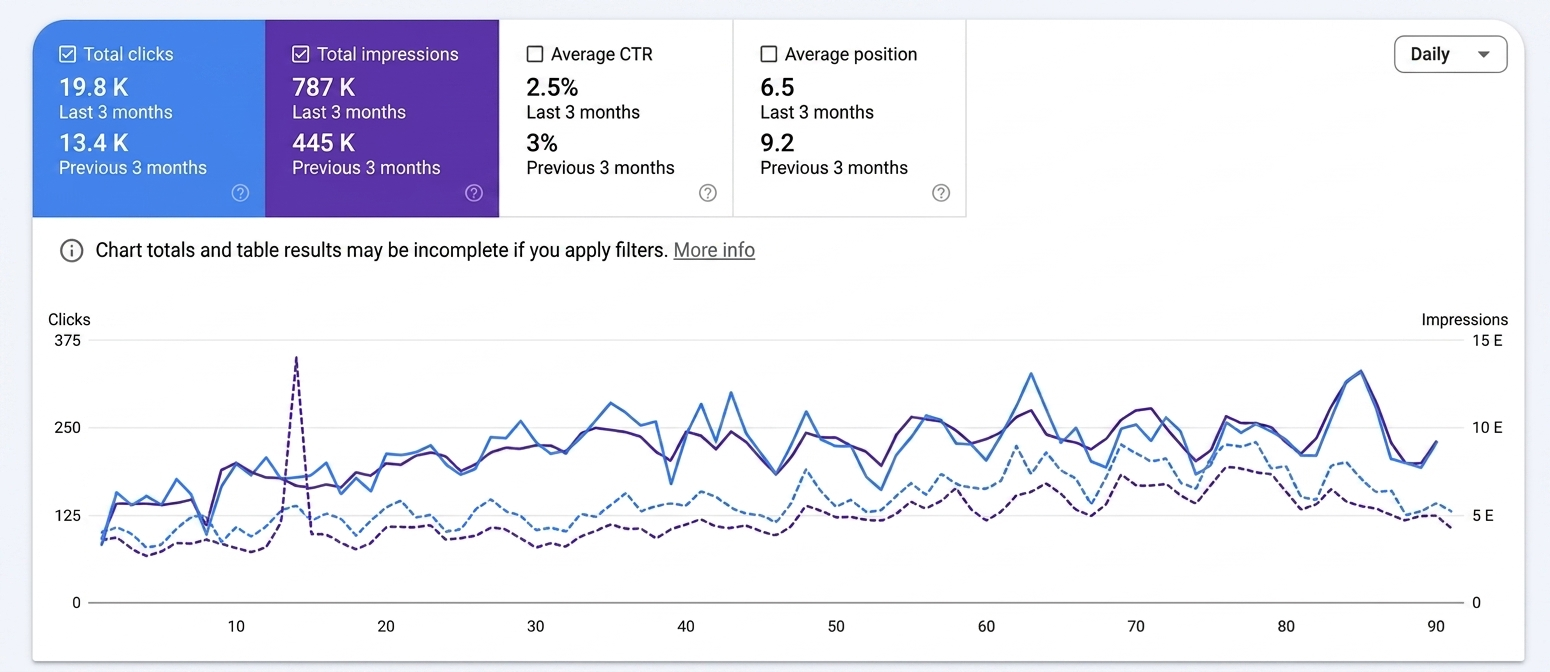
A post a day, every day, for 90 days. This is what that compounds into on a blog that starts from nothing.